
Last spring, a small boutique owner in Lahore filmed a thirty-minute video about how she picks fabric for the summer lawn collection. She set up her phone on a stack of books, talked through five prints, answered three questions customers always ask, and posted it on her page. Three months later, the video had 400 views, and she hadn’t filmed anything since. She did not lack ideas. She lacked time, and one long video felt like a project she could only face once a season.
Meanwhile, her competitors posted every day. Not long videos, just short ones. A fifteen-second clip of a print catching the light. A forty-second answer to one customer question. A quick before and after of a stitched suit. None of those clips took a day to make, and none of them needed a new idea. They were all cut from videos the owners had already filmed, and that is the part most small businesses miss.
That daily posting is not a filming habit. It is a cutting habit. Owners who turn long videos into short clips film once and post for weeks, while owners who film fresh every day burn out by month two. The difference is not talent or budget. It is the decision to turn long videos into short clips instead of treating each video as a finished product. Once you see a long video as material, every talk, demo, and question session you ever filmed becomes a month of posts waiting to be cut.
You do not need to film more to post more. You need to turn long videos into short clips, and one good long video can carry a whole month of posts if you cut it the right way. This article shows how small businesses do that without an editing team, without expensive software, and without filming anything new. The system is simple; it takes about two hours for one long video, and it works with the phone you already own.
I have watched too many owners treat a long video as a single post. They film it, post it, watch it stall, and decide video does not work for them. The video was never the problem. The format was. A thirty-minute video asks a stranger for thirty minutes, and strangers do not give that to a shop they just found. A forty-second clip asks for forty seconds, and that is a fair ask. Cut the long video into fair asks, and the same content finally gets watched.
To turn long videos into short clips is not to chop a video into random pieces. It is to find the moments that already work on their own, give each one a clear start and finish, and present it in the shape feeds prefer. A highlight reel is not the same thing, because a reel still needs the original to make sense. A real clip stands alone, teaches one thing, and ends with one job. That standard is what separates clips that travel from clips that just exist.
Why long videos sit unwatched while short clips get all the attention
The first reason is the simplest one, and most owners refuse to believe it. A long video is not failing because it is bad. It is failing because nobody finds it. Short clips travel through feeds, and feeds are where strangers meet your business for the first time. Long videos sit on your channel or page, waiting for someone who already knows you. A stranger will not search for a thirty-minute video from a shop they have never heard of, but the same stranger will watch a forty-second clip that the feed puts in front of them.
Feeds reward clips because clips are easy to try. A stranger risks forty seconds on an unknown shop, and that small risk is the whole game. When you turn long videos into short clips, you give strangers many small risks to take instead of one large risk they will refuse. Each clip is a doorway into your business, and a business with six doorways gets found more often than a business with one locked door.
The second reason is the length trap. Owners film everything in one take because it feels efficient, and then they post the whole take because cutting feels like extra work. The result is a video with a slow start, three good minutes buried in the middle, and a long goodbye at the end. Viewers leave in the first ten seconds, and the platform notices. A clip that opens on the strongest line keeps people watching, and a long video that opens on a greeting loses them before the good part starts.
The length trap has a second cost that owners rarely count. A long video with a slow start does not just lose viewers; it teaches the platform to show your next video to fewer people. When you turn long videos into short clips, each clip that gets watched fully tells the platform your work is worth showing, and that record builds. A long video that loses viewers early does the opposite, and the damage lasts longer than one post.
The third reason is the one-clip mindset. Most owners think one video means one post, so they post the long video once and move on. That is like printing one poster and calling it a marketing plan. One long video holds six or seven posts easily, sometimes more, because a good talk covers several points and each point can stand on its own. Owners who see one video as one post throw away most of the value they already filmed.
Do the maths on one long video before you decide it is worth one post. A thirty-minute talk holds at least six moments that teach one thing each, and six moments mean six weeks of weekly posts from a single filming day. Owners who turn long videos into short clips get six weeks of visibility from one afternoon of work. The filming cost is identical whether you post once or turn long videos into short clips, and the return is six times larger.
The fourth reason is vertical blindness. Small businesses film horizontally because that is how phones used to film, and then they post the horizontal video into vertical feeds where it shrinks into a small strip with black bars on both sides. The text becomes unreadable, the face becomes tiny, and the viewer swipes past. Short clips are vertical first, and a clip that fills the phone screen holds attention in a way a shrunken horizontal video never will.
The fifth reason is silent viewing. Most people watch short clips with the sound off, at least at first, while they are in a shop queue or on a bus or sitting next to someone asleep. A long video without captions loses those viewers in seconds, because they cannot tell what it is about without turning the sound on. A short clip with clear captions tells the whole point silently, and the viewer turns the sound on only after they already care.
Captions are not an accessory in this system; they are the price of entry. When you turn long videos into short clips, captions do two jobs at once. They let silent viewers understand the clip, and they let searching viewers find it, because platforms read caption text. A clip without captions is a clip that only works for viewers with sound on and time to spare, and that is a small audience for a small business to depend on.
The sixth reason is the missing next step. A long video often ends with nothing, or with a vague line like follow for more. A short clip can end with one clear job, such as message us for the price, or watch the full tutorial through the link. It is the same trap as short-form video marketing that gets views but no sales, because attention without a next step is just entertainment. Clips work when each one carries a single job, and long videos fail when they carry none.
Give every clip exactly one job, and say it plainly. Message us for the price, watch the full tutorial, or book the weekend class are jobs. Follow for more is not a job; it is a wish. When you turn long videos into short clips, the job is what turns a viewed clip into a customer, because viewers who know what to do next do it. Viewers who are only entertained scroll on, and entertainment alone pays no bills.
The seventh reason is the perfection habit. Owners rewatch their long video, notice every pause and every wrong word, and decide it is not good enough to cut into clips. So they film nothing, post nothing, and wait for a perfect day that never comes. A clip does not need the whole video to be perfect. It needs forty good seconds, and almost every honest long video has several forty-second stretches that are better than anything the owner gives themselves credit for.
The eighth reason is the tool excuse. Owners believe they need editing software, a laptop, and a course before they can cut a clip, so they never start. The truth is smaller. A phone editor, the free tools inside YouTube itself, and one quiet evening are enough for a first batch of clips. The owners who post every day are not better equipped than you. They just stopped waiting for better equipment and started cutting what they already had.
The tool excuse falls apart the moment you time the work honestly. Cutting six clips manually takes about two hours, and most of that is choosing moments, not operating software. Owners who turn long videos into short clips with a phone editor spend less time editing than owners who spend a month researching the perfect tool. The perfect tool is the one you already have, used this week, on a video you already filmed.
Read those eight reasons together, and the picture is clear. The long video is not the enemy, and filming more is not the answer. The answer is a system that takes one long video, finds the moments that stand alone, and turns them into short clips that fit the feeds where your customers actually spend time. The next section shows that system working for one small business, with real numbers and one honest limitation.
The cooking teacher who turned one tutorial into six weeks of clips
Let me show you what changed for one small business. The details below are an illustrative example, built from patterns I have seen across small food businesses, not a promise that your numbers will match. The pattern matters more than the numbers, because the pattern is what you can copy.
Sana’s story is useful because her starting point is ordinary. She had one video, a small audience, and no editing experience, which is exactly where most small businesses start. She did not buy software, hire an editor, or film anything new. She simply decided to turn long videos into short clips, and she followed a plain routine for six weeks. The routine for how to turn long videos into short clips is the lesson here, not the biryani, and it transfers to any business with a video and a customer question.
Sana teaches weekend cooking classes from her home in Lahore, and most of her students find her through WhatsApp. In January, she filmed a forty-two-minute biryani tutorial on her phone, posted it on YouTube, and shared the link with her students. Three months later, the tutorial had nine hundred views, her channel had eleven hundred subscribers, and the video had stalled completely. Nobody new was finding it, and she had no time to film a second tutorial.
She did not film anything new. She watched her own tutorial with a notebook, the way a student would, and marked every moment that made her stop and think. She found nine moments, then cut the list to six, because three of them only made sense if you had watched the previous ten minutes. The six that survived all passed one test. Each one made sense to a stranger who had never seen the tutorial, and each one taught exactly one thing.
The six clips were simple. One showed the single mistake that makes biryani mushy. One showed how to layer rice, so the grains stay separate. One showed a ten-minute marinade shortcut for working days. One explained dum on a low flame without any jargon. One showed a two-minute raita. One showed how to reheat biryani without drying it out. Every clip ran between thirty and fifty seconds, every clip was vertical, and every clip carried captions, because Sana knew most of her viewers would watch with the sound off first.
Notice what the six clips have in common. Each one solves a problem the customer already has, and none of them needs the tutorial to make sense. That is the test every clip must pass, and it is stricter than it looks. When you turn long videos into short clips, the clips that travel are almost always the ones that fix a worry, correct a mistake, or save time. Clips that merely show a process travel only when the process itself is the worry.
She did not pick moments at random. She picked moments that opened on a hook, and she shaped them with the same discipline as Instagram Reels hooks that stop the scroll, because a clip without a hook is just a short, long video. The mushy biryani clip opened on the mistake itself, not on a greeting. The layering clip opened on the finished pot, not on the ingredient list. Viewers stayed because the first second already showed them the payoff.
She posted one clip a week for six weeks, always on the same two days, and every clip ended with the same two jobs. The caption told viewers the full tutorial was linked, and the pinned comment gave the weekend class dates. She did not post all six clips in one week, even though she was tempted, because she had learned that a flood of clips teaches the feed nothing. One clip a week gave each clip its own chance, and it gave her time to read the comments before the next one went out.
The rhythm did quiet work that the clips alone could not do. Posting on the same days taught her audience when to look, and it taught Sana when to listen, because comments arrived on a schedule she could actually answer. Owners who turn long videos into short clips and then post them all at once lose that conversation. A clip posted into silence teaches you nothing, while a clip posted into a rhythm teaches you what your audience wants next.
After six weeks, the numbers told a clear story. The six clips had thirty-one thousand views between them, and the two problem-led clips carried most of it. The mushy biryani clip alone passed twelve thousand views. Her channel gained three hundred and forty new subscribers; she got twenty-three messages asking about weekend classes, and nine of those messages turned into paid bookings. The old tutorial gained thirteen hundred extra views as well, because every clip pointed back to it.
The link back deserves more credit than it usually gets. Every clip pointed to the full tutorial, and the tutorial gained thirteen hundred extra views from viewers who wanted more than forty seconds. That is the compounding effect owners miss when they judge clips alone. To turn long videos into short clips is not to replace the long video; it is to build roads toward it, and roads bring travellers that a single signpost never would.
Two clips flopped, and the flops taught her as much as the winners. The raita clip and the reheating clip stayed under three hundred views each, because they solved problems nobody was searching for. Nobody lies awake worrying about raita. People do lie awake worrying about mushy biryani, and that worry is what made the winners travel. The two problem-led clips carried the whole batch, and that pattern changed how she picks moments now.

Today, Sana films one long video a month, and she never films daily clips. She spends one evening cutting six clips from that month’s video, schedules one a week, and answers the comments as they come. Her filming day is still one day a month. Her posting, though, is every week, and her classes fill from the clips, not from the long video. That is what it means to turn long videos into short clips, and it is a system any small business can copy with one phone and one evening.
Copy the routine, not the numbers. Your first batch may bring thirty views or three thousand, and neither result changes what to do next. Keep cutting one video a month, keep posting on a rhythm, and keep the moments that stand alone. Owners who turn long videos into short clips for six months build a library that works while they sleep. Owners who quit after one batch build nothing, and then blame the format instead of the habit. The habit is simple: turn long videos into short clips every month.
Pick the right way to turn long videos into short clips
There are three honest ways to cut clips from a long video, and the right one depends on your time, your money, and how much control you want. A manual edit on your phone costs nothing but takes the longest. YouTube’s own Remix tool is free and fast, but it only works for videos already on your channel, and only on your phone. An AI clipper finds moments for you in minutes, but it charges a monthly fee, and its picks still need your eyes before they go out.
Start with the method that matches your week, not the method that impresses other creators. A busy shop owner with two free hours should cut manually and learn the eye. An owner with a channel full of videos and no free evening should start with Remix and get clips out this week. The right way to turn long videos into short clips is the way you will still be using in three months, because a method you abandon helps nobody.
For most small businesses, the manual edit is the right starting point, even though it is slower. You learn what a good moment looks like, and that judgment is what makes every later method work better. Owners who jump straight to an AI clipper often post weak clips, because they cannot tell a strong moment from a weak one yet. Learn the eye first, and the tools become useful instead of random.
YouTube’s Remix path deserves a special note, because it is free, and it links every Short back to your original video on its own. If your long video already lives on YouTube, Remix is the fastest honest route to a first batch of Shorts. YouTube’s own guide to creating Shorts from your videos explains the Remix steps, and it confirms the one rule that matters here. Only you can edit your own long video into a Short, which is exactly how it should be.
| Method | Time for one clip | Cost | Control | Best for |
|---|---|---|---|---|
| Manual edit on your phone | 20 to 40 minutes | Free | Full control over every cut | Your first batch, and learning the eye |
| YouTube Remix tool | 5 to 10 minutes | Free | YouTube only, phone only | Videos already on your channel |
| AI clipper tool | 2 to 5 minutes of your time | Monthly fee | You approve every pick | Weekly batches once you know good moments |
Read the table one row at a time, not as a ranking. The fastest method is not the best method for a beginner, and the cheapest method is not the worst. A beginner who starts with Remix gets clips out this week, and a beginner who starts manually understands clips for life. The owners who last are the ones who pick one method, use it for a month, and only then judge it. Switching tools every week is another form of not posting.
Use the table as a decision tool, not as a verdict. Time, cost, and control pull in different directions, and your business gets to choose which pull matters most this month. A beginner who values learning picks manual. A busy owner who values speed picks Remix. An owner with a backlog of videos picks an AI clipper and spends the saved hours answering comments. All three choices are honest ways to turn long videos into short clips, and all three beat filming nothing.
One more comparison matters, and it is not in the table. A clip made from your own long video beats a clip filmed fresh, for one simple reason. The long video already proved the idea. Someone watched it, or it answered a real customer question, or it covered a topic your buyers already ask about. A fresh clip starts from zero proof. A cut clip starts from proof, and that head start is worth more than any editing trick.
Proof is the quiet advantage of cutting over filming. A fresh clip asks viewers to trust an idea with no record behind it. A cut clip carries the record of the long video it came from, because real customers asked the question it answers. When you turn long videos into short clips, you are not guessing what your audience wants. You are repeating what they already told you they want, in a shape they can actually watch.
Turn long videos into short clips in seven steps
The system below takes about two hours for one long video, and most of that time is thinking, not editing. You will spend the first hour finding moments and the second hour cutting them. Do not rush the first hour, because a badly chosen moment cannot be saved by good editing. A well-chosen moment, on the other hand, survives a plain cut with plain captions.
Two hours is an honest estimate for how long it takes to turn long videos into short clips, not a sales promise. The first hour goes to reading the transcript and marking moments, and beginners often need longer, because choosing is a skill. The second hour goes to cutting, reframing, and captioning, and that hour shrinks fast with practice. Owners who turn long videos into short clips for the third time usually finish in ninety minutes, and the quality goes up, not down, because their eye improves.
Work through the steps in order the first time, even if you are tempted to skip ahead to the cutting. The order is the system. Picking before cutting stops you from polishing weak moments, and packaging after cutting stops you from posting clips with no job. After your third batch, the order becomes habit, and the whole routine fits into one evening.
The order protects you from your own taste when you turn long videos into short clips. Owners love their favourite moments, and favourite moments are often the ones that need the most context. Choosing before cutting forces you to judge moments by the stranger test, not by affection. Packaging after cutting forces you to give each clip a job, instead of posting a beautiful clip that does nothing. Skip the order, and you will polish clips that should have been cut from the list.
Pick one long video that has already proven itself
Start with a video that has real proof behind it, such as steady views, comments, or questions customers keep asking you in person. A forty-minute tutorial that answered real questions beats a beautiful video nobody watched, because proof tells you the idea already matters. Fifteen to forty-five minutes is the sweet spot. Shorter videos hold too few moments, and videos over an hour hide their best parts under too much filler. If you have no long video yet, film one question-and-answer session this week, and use it as your first source.
Get the transcript and mark the moments
Read the transcript instead of rewatching the whole video, because reading is faster than watching, and it shows you the structure. YouTube gives you auto captions for videos on your channel, and free transcription tools cover videos that live elsewhere. Read through once with a pen, literal or digital, and mark every passage that teaches one thing, answers one question, or tells one short story. Aim for eight to ten marks. You will keep fewer, and that is fine.
Keep only moments that work alone
Run every marked moment through the stranger test. Would a stranger who never saw the long video understand this clip and get value from it alone? If the moment needs the previous five minutes to make sense, cut it from the list, no matter how much you like it. Problem-led moments pass this test most often, because a problem is understood instantly. Process moments fail it most often, because a step only matters inside its sequence. Six to eight survivors is a strong batch.
Cut on complete thoughts, not on seconds
Set your in point on the first word of a complete thought and your out point on the last word of it, even if the clip runs a little long or a little short. Thirty to sixty seconds is the range to aim for, but a complete thought at sixty-five seconds beats a cut-off thought at forty-five every time. Leave half a second of breathing room at both ends, so the clip does not start or end with a jolt. Then watch the cut once with the sound off. If it still makes sense silently, the cut is right.
Reframe vertical and add captions
Reframe to vertical nine by sixteen, keep the speaker’s face centred, and keep captions clear of the places where apps put their own buttons. On a standard vertical frame, that means keeping text out of the bottom quarter and away from the right edge, where likes, comments, and descriptions sit. Add captions to every clip, because most viewers meet your clip silently first. One or two lines at a time is enough, and each line should stay on screen long enough to read twice.
Package each clip with its own hook and link back
Give every clip its own title that states the payoff, not the long video’s title. A clip titled after the tutorial tells nobody why to stop, while a clip titled after the mistake it fixes stops the right person instantly. Open on the payoff in the first second, end the caption with one clear job, and link back to the full video wherever the platform allows it. The link back is what turns clip viewers into long video viewers, and long video viewers into customers.
Post on a rhythm and keep the winners
Post one or two clips a week on the same days, and resist the urge to post the whole batch at once. A rhythm teaches your audience when to expect you, and it gives each clip its own chance to travel. After four weeks, look at which moments travelled and which ones stalled, then let that answer shape your next batch. Double down on problem-led winners, retire the types that stalled, and cut the next long video the same way. One evening a month keeps the whole system running.
A finished batch looks unimpressive, and that is a good sign. Six plain vertical clips, each under a minute, each with captions, each pointing back to one long video. No fancy transitions, no trending audio forced onto a serious topic, no filming marathon. Owners often feel they should have done more, because the work felt too simple. Simple is the point. A system you will repeat beats a masterpiece you will never repeat.
Simple is not the same as careless. A plain vertical clip with correct captions and a clear job beats a flashy clip with transitions nobody asked for, because viewers remember the point, not the polish. Owners who turn long videos into short clips sometimes feel they should add more, as if simplicity were a confession. It is the opposite. Simplicity is what makes the system repeatable, and repeatability is what makes it work.
The most common failure at this stage is not technical at all. Owners cut six clips, post two, and then stop because the first two did not go viral. Virality was never the job. The job is a steady stream of useful clips that keep your business visible week after week, and that job is measured in months, not in one weekend. Sana’s first two clips were not her winners either. Her winners came in week three and week four, after she had kept going.
Patience is part of the system, not a consolation for failure. Sana’s winners arrived in week three and week four, after two quiet weeks that tempted her to quit. Platforms need time to learn who likes your clips, and audiences need time to learn that you post every week. Owners who turn long videos into short clips for one month and then judge the system are judging a seed, not a harvest. Give it three months, and judge the library, not the week.
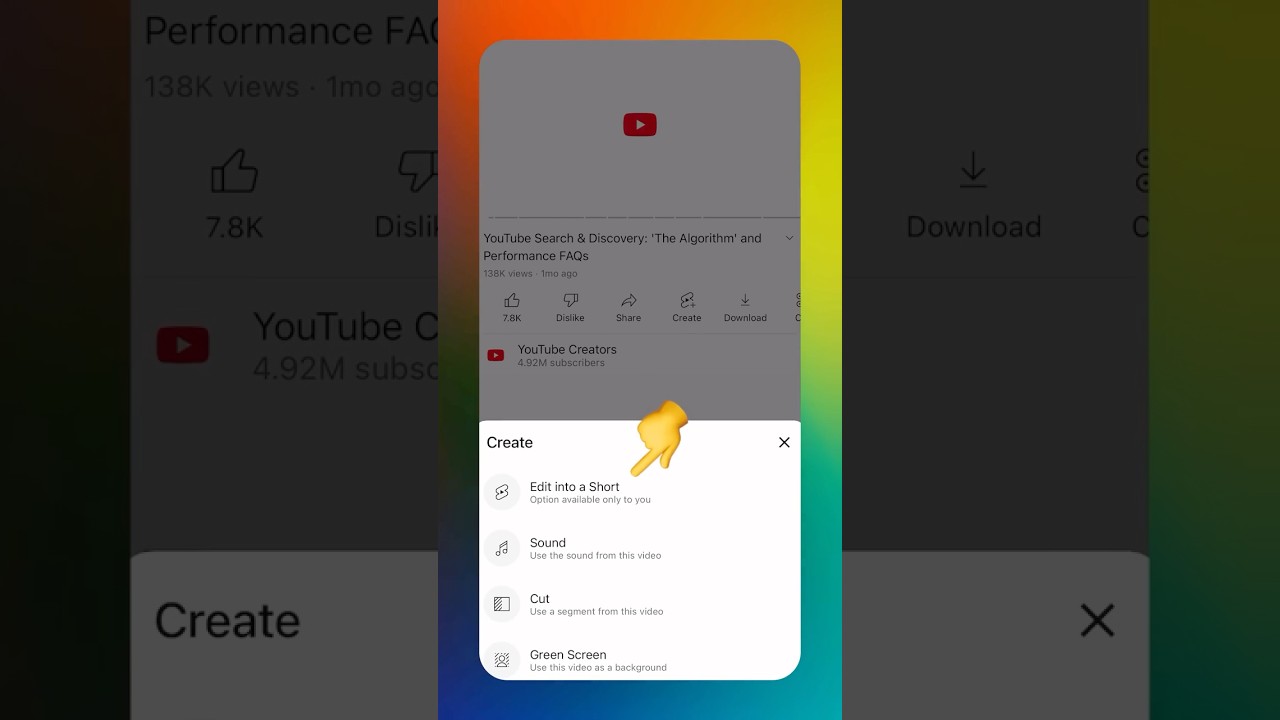

Watch the official method once before your first batch, even if you plan to cut manually. Seeing the Remix flow shows you what a finished Short is supposed to feel like, and that feeling guides every later cut. You will notice how short the window is, how fast the hook arrives, and how little of the original video each Short actually uses. That smallness surprises most owners, and it frees them, because it means their long video holds far more clips than they feared.
Review every clip yourself before it goes out, even if a tool picked the moments for you. Tools can find loud moments and emotional peaks, but they cannot tell whether a moment is true, fair, or right for your business. Watch each clip from start to finish, read its captions, and check that the framing kept the important thing in view. A clip with your name on it is your responsibility, no matter which tool cut it.
Only clip videos you own or have permission to use. A clip taken from someone else’s video can be removed, and repeated removals can cost you the account. This rule applies even if you credit the original creator, and even if the video is public. Your own videos, your own talks, and your own classes are your safest source, and they are more than enough.
A useful review takes ten minutes for a batch of six, and it follows the same three checks every time. First, does the clip make sense to a stranger? Second, are the captions correct and readable? Third, does the clip end with one clear job? Any clip that fails the first check goes back to the cutting room, even if you love it. The other two checks are fixes, not verdicts, and most clips pass them after one small edit.
Keep the routine small on purpose. One long video a month, one evening of cutting, one or two clips a week, and ten minutes of review per batch. Owners fail when they turn this into a production studio with schedules, software subscriptions, and a team they cannot afford. A small business does not need a studio. It needs one evening a month and the discipline to repeat it.
Your first batch checklist
- Source video picked, with real proof behind it, not just your favourite
- Transcript read and eight to ten moments marked
- Every kept moment passes the stranger test on its own
- Cuts land on complete thoughts, with half a second of breathing room
- Vertical framing centred, captions clear of buttons, sound-off check done
- Each clip has its own hook title and a link back to the full video
- Posting rhythm set: one or two clips a week, on the same days
Use this checklist beside you for your first three batches, and tick each line honestly. After three batches, you will not need it anymore, because the checks become instinct. Owners who skip the checklist usually skip the stranger test first, and their clips show it. A clip that needs the original video to make sense is not a clip, and no caption can rescue it.
There is one fair exception to the checklist, and it is rare. A live event, a sudden offer, or a genuine news moment in your niche can justify a fast clip that skips the rhythm. Post it, enjoy it, and then return to the rhythm the next week. Exceptions work because they are rare. A feed full of exceptions is just a feed with no rhythm, and audiences trust rhythm more than excitement.
Pros
- No new filming: one filming day a month feeds weeks of posts
- Ideas already proved: the source video answered real customer questions
- Steady rhythm: batches make weekly posting easy to keep
- Link back effect: clips send viewers to the long video too
- Lower pressure: cutting feels easier than performing for a camera
Cons
- Limited to what you already filmed: no new topics without new footage
- Old footage can look dated if the source video is years old
- Vertical reframing can crop badly when the source was wide
- One weak source video gives a weak batch, however well you cut
- Clips still need review, captions, and packaging: not free work
Weigh the two sides honestly before you choose. If you already have even one decent long video, cutting beats filming fresh, because proof and rhythm matter more than novelty. If you have no long video at all, film one simple question-and-answer session this week, and let it become your first source. Either way, the work starts with one video, not with a content calendar full of ideas you have not filmed.
That is the whole system, and it fits on one evening. Pick a proven video, read its transcript, keep the moments that stand alone, cut on complete thoughts, reframe vertical with captions, package each clip with its own hook and link back, and post on a rhythm. Do it once, and the second batch takes half the time, because you already know what a good moment looks like.
Conclusion
One long video, six short clips, and one evening a month. That is the system, and it asks for nothing you do not already have. You already own a phone, you already know your customers’ questions, and you probably already have a long video sitting somewhere with more value left in it than you think. Cut it, and let the clips do the daily work while you run the business.
If video is only one part of your marketing, and you want the whole routine handled together, our digital marketing services cover video alongside the rest of your presence, so the clips are not working alone. A clip that brings a viewer is good. A clip that brings a viewer into a business that is ready for them is better, and readiness covers the page, the offer, and the reply.
The best day to turn long videos into short clips was the day you filmed your first long video, and the second-best day is this week. Pick that video, find six moments, and post the first clip before the week ends. When you turn long videos into short clips, the first batch teaches you more than any guide can, because your own audience tells you which moments travelled. Start small, keep the rhythm, and let the library build.
Start this week, and start small. Pick one long video, find six moments that stand alone, and post the first clip before the week ends. Do not wait for better equipment, a better camera, or a quieter month. The owners who post every week are not the ones with the best equipment. They are the ones who cut what they already had. Your first clip will not be perfect, and it does not need to be.
FAQs
Can I turn long videos into short clips without editing software?
Yes. Your phone editor and YouTube's free Remix tool cover a first batch, and both work without a laptop or a paid subscription. Start there, and add tools only when the routine already works.
How long should a short clip be?
Aim for thirty to sixty seconds, and let a complete thought matter more than the clock. A complete thought at sixty-five seconds beats a cut-off thought at forty-five seconds every time.
Do short clips need to be vertical?
Yes for feeds like Shorts, Reels, and TikTok, which are vertical first. A horizontal clip shrinks into a small strip with black bars, and viewers swipe past it. Reframe to nine by sixteen and keep the face centred.
Can I use someone else's long video for short clips?
No, not without permission. Only clip videos you own or have permission to use, because clips taken from someone else's video can be removed, and repeated removals can cost you the account.
How many short clips can one long video give?
A video of fifteen to forty-five minutes usually gives six to eight clips that stand alone. Longer videos hold more moments, but the count matters less than the test: every clip must make sense to a stranger on its own.